An AI Pokémon fusion generator creates new artwork from two Pokémon you choose. On Pokémon Fusion, you select the parents and let the generator interpret their shapes and features as one creature. You can then inspect the result as a collectible card. This guide walks through the process and uses three existing creations from our collection to explain what makes a pairing interesting.
Choose two Pokémon and generate a fusion
Open the Pokémon fusion generator and sign in. Search for a Pokémon in each of the two selection fields, then select its name from the results. The Random controls can suggest a starting point when you do not have a pair in mind.
Check your credit balance before choosing Generate Fusion. A successfully saved AI fusion uses one credit. Keep the generation window open while the result is being prepared; starting another generation is a separate attempt, even when you keep the same parents.
You do not need to write a prompt. The two parent selections are your creative input. Try a pair with a shared body shape for a familiar-looking result, or choose contrasting shapes and materials for a more surprising combination.
Inspect the result and find your saved card
When generation finishes, look at the whole creature before focusing on small details. Can you recognize both parents? Do the head, body and limbs form one understandable shape? Check the edges of wings, claws and tails as well as the face.
Use Inspect card to open the collectible view. The saved card shows its own type, HP, moves and finish; those details belong to this site’s fusion system. A fiery illustration does not, by itself, tell you which type or attacks the saved card has.
Open Gallery to find your saved fusions again. Search for the creation and inspect it there, or use the available Download and Share controls. The examples below are existing saved cards, with their original creation dates retained.
 HP 108
gardevoir × meowscarada
Gardevoir × Meowscarada: start with compatible shapes
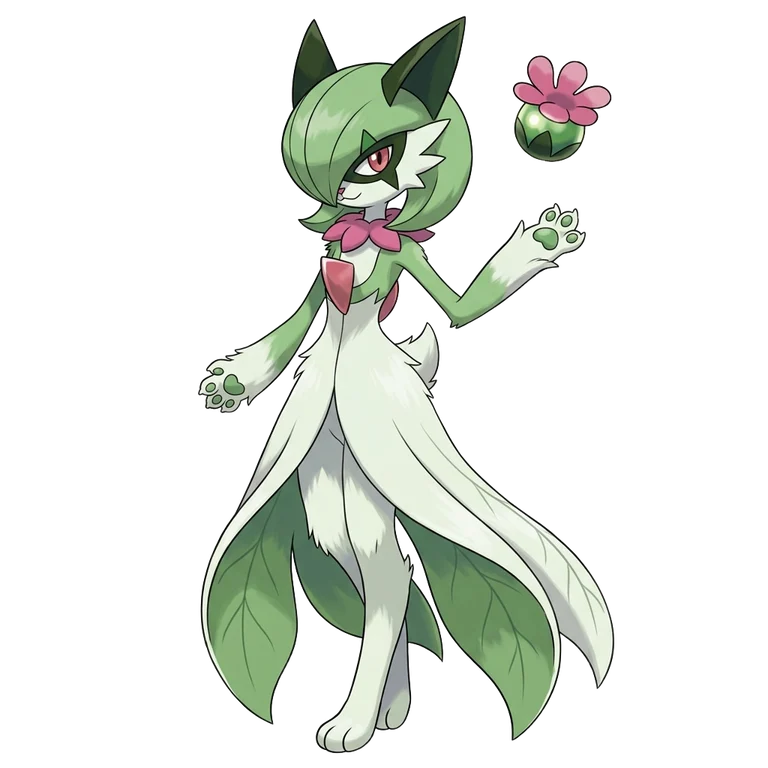
Gada is a useful example of choosing parents with a compatible upright shape. The artwork brings together a sweeping green fringe, pointed cat ears, a red chest accent and long white panels that open like leaves. The raised paw and floating flower give the pose a clear focal point.
The design lesson is to look for features that can share the same body. Here, the head shape, face markings and coat-like silhouette give both parents room to be recognizable. A new generation of this pair may interpret those features differently; this saved image is one result, not a guaranteed template.
Gada’s saved card is Fairy type with 108 HP, Quick Attack and Moonblast. Inspecting those details adds information that the illustration alone cannot supply. For more pairings built around disguise and elegant silhouettes, explore our Fairy fusion ideas.
 HP 131
rayquaza × scizor
Rayquaza × Scizor: carry a pattern across a new body
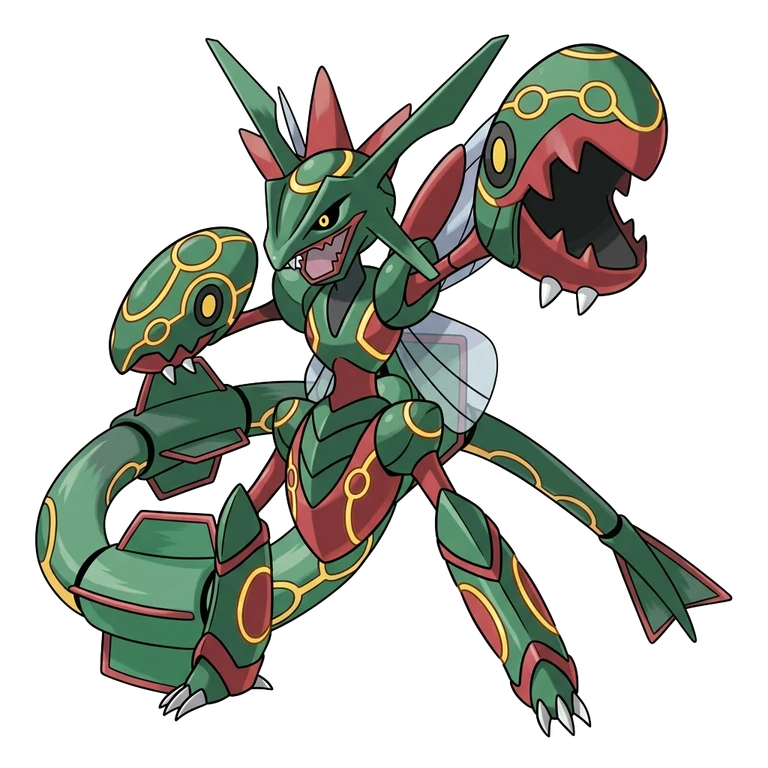
Raor shows what can happen when the parents have very different outlines. Large pincers and plated legs establish an armored stance, while the pointed head and curling tail bring a dragon-like shape into the design. Translucent wings sit behind the torso.
The gold rings are especially useful to study: they repeat across the claws, body and tail, helping the separate features look related. When choosing a contrasting pair, think about which colors or markings could connect the result. You do not need every recognizable feature from both parents to survive unchanged.
The saved card carries Steel typing, 131 HP, Wing Attack and Extreme Speed. Those are the recorded details for Raor, rather than a calculation for a different Pokémon game. Our Rayquaza fusion collection offers other ways to reinterpret the same parent.
 HP 97
ampharos × charcadet
Ampharos × Charcadet: change the surface and keep the outline
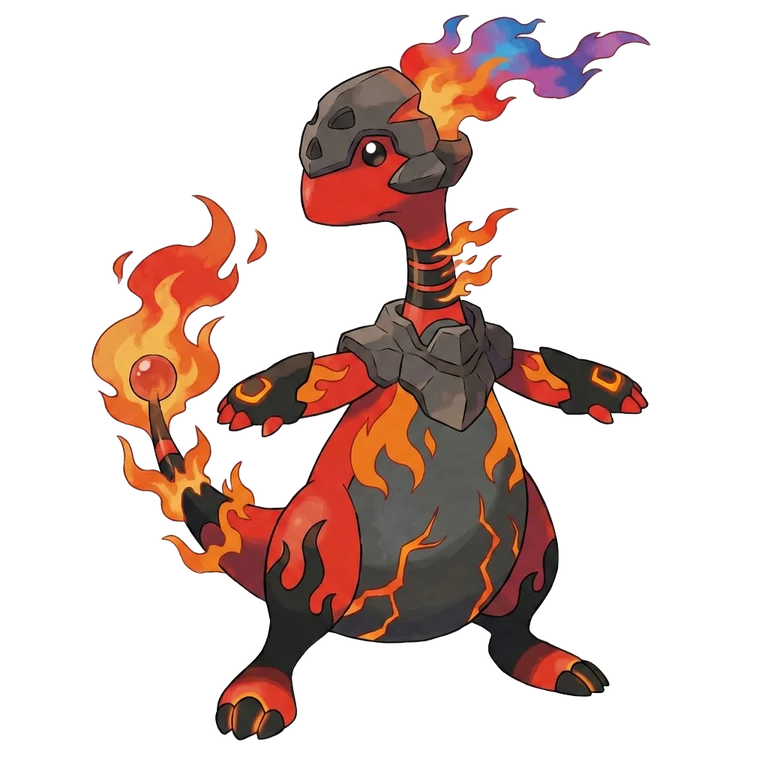
Amphcadet keeps a rounded body, long neck and curved tail easy to recognize, then changes their surface. Dark armor covers the head and chest; red and orange coloring carries the fire theme into the limbs and belly. Flames rise from the head and tail without hiding the main outline.
This gives you another way to choose fusion partners: keep a simple silhouette in mind and let the second parent suggest armor, markings or an element. When reviewing the result, check whether those additions remain readable at card size. A strong shape can be more effective than a large number of small decorations.
Amphcadet’s saved card is Fire type with 97 HP, Tackle and Thunder. The Electric charged move is a reminder to inspect the actual card instead of guessing its moves from its flames. For another take on elemental contrasts, see our Fire and Ice fusion ideas.
Will the same two Pokémon always produce the same image?
AI generations can vary. Reusing the same parents can lead to a different pose, balance of features or overall shape. Swapping the selections is another way to experiment, but this generator does not promise a fixed head-and-body formula or an exact reversed result.
If you are exploring several ideas, change one parent at a time and compare the results. That makes it easier to notice which features a partner contributes. Use the Popular collection and existing blog examples for inspiration before spending another credit.
Is this the same as Pokémon Infinite Fusion?
Pokémon Fusion is an independent fan project for creating AI artwork and collecting fusion cards. Pokémon Infinite Fusion is a separate fan game with its own sprites and rules. A card generated here is not an installable game sprite, and its HP or moves should not be used as an Infinite Fusion team calculation.
Choose a tool according to the result you want: original artwork and cards, a sprite combination, or game-specific statistics. Our collectible card guide explains the finishes and battle rules used on this site.
What if the AI service is unavailable?
If you see Oh no! The fusion got away!, the site shows an illustrated error message instead of a fusion card. A confirmed failed attempt does not consume a credit. Wait a moment, then use Try fusion again to retry your selected pair. There is no fallback card to like, inspect or save.
If the site says your fusion is still being prepared or its status could not be confirmed, check Gallery or use Check fusion status before starting another attempt. Only a successfully saved result appears as your fusion card. The cards featured in this article are existing collection examples with their saved artwork and metadata.
Start with a pair you can describe in one sentence: a graceful creature with leaf details, an armored dragon, or a familiar outline with a new element. Then create a fusion, inspect the result and decide what you want to try next.
Generate a Fusion
Inspired by these creations? Choose two Pokémon and bring your own fusion to life.
Create Your Fusion